How to review your first live week on Binance against your demo log
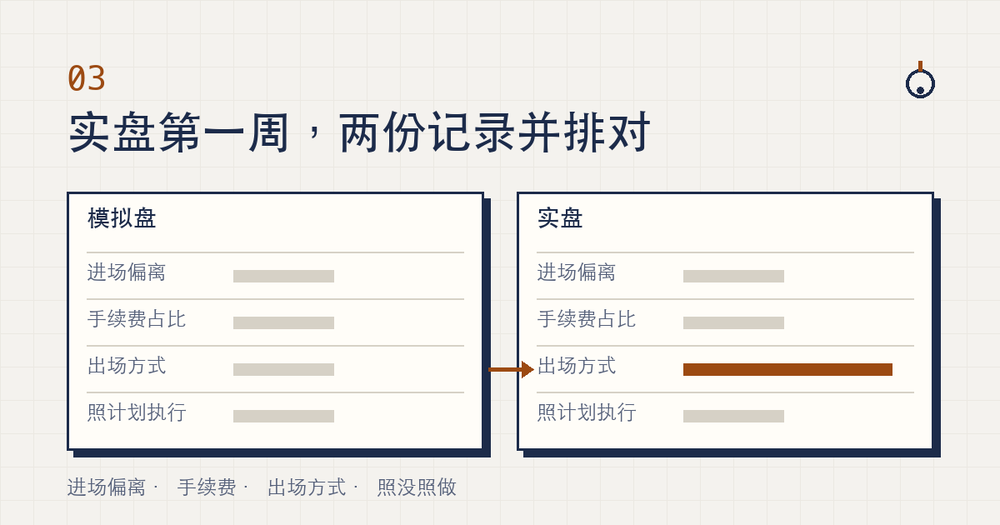
After your first full week with real money, the review has one job. Line up the last stretch of your demo log next to this week's real fills, compare them column by column, and find the column where the two sides drift furthest apart. That column is the only thing you change next week. Whether the week made or lost money can wait.
The reasoning is simple. A handful of trades says almost nothing about whether your method is any good, but it says plenty about what changed when the same method moved from play money to real money. As of November 2026, Binance's own help page, "How to Use Binance Demo Trading?", still warns that there may be discrepancies in the chart data, actual order book pricing and trade order execution compared with the live market. The weekly review turns that warning into your own numbers.
In this read
Your demo log is handwritten; where do live fills come from?
The two sides come from different places. Your demo record exists only if you wrote it down while practising. The same help page lists "all export features" among what Futures demo trading does not support, and says demo order details are not visible to Binance's Customer Support team. If you skipped the notes during practice, there is nothing to recover now — which is why the five-numbers practice log is the starting point for any review.
The live side you export. On the web it is Orders → Spot Order → Trade History → Export Trade History; the full click path, with a screenshot, is in the article on a first losing trade. Three lines on Binance's "How to Download Spot Trading Transaction History Statement?" page matter for a weekly routine. This is how the page read in November 2026; if Binance changes it, follow the page:
- You can generate up to 5 statements per month. One per weekly review uses four or five, so don't spend them mid-week.
- The download link is kept for 7 days. Generate and download on review day.
- Times are in UTC+0. Shift the live column into whatever time zone you used in your demo notes before you match trades, or an evening order can land on the wrong day.
Which live trades to match against which demo trades
You are comparing one method in two settings, so every pair has to share three things: the same trading pair, the same order type (limit with limit, market with market), and a written plan made before the order. A trade that fails any of the three stays out of the table; note it on the side.
Match the counts. If five live trades qualify this week, take the last five qualifying trades from your demo log. The end of your practice is the fairest picture of how you trade once the buttons are familiar. Comparing against your first clumsy days on demo would mix beginner mistakes into the gap and hide what real money actually changed.
Trades placed without a plan card can't fill the first column, though the other three still work. Mark them "no card". Making that mark disappear is next week's first task; the card itself is described in the four-line pre-trade card.
Demo versus live: four columns, one gap each
Demo on the left, live on the right. Each column reduces to a single number per side, and the gap is one minus the other.
- Entry drift: Fill price minus the planned entry on your card, as an absolute value, divided by the planned price. Average each side; how much more does live drift?
- Fee share: Buy fee plus sell fee, divided by the trade amount. If your demo log has no fees, add them at your live fee rate first, or the sides aren't comparable.
- Exit type: Stop-loss triggered, take-profit triggered, or sold by hand. Count manual exits on each side.
- Followed the plan: The "followed / didn't" line at the bottom of the card. Count the "didn't" trades on each side.
Profit is not a column. It is what the four columns add up to. Get the columns right and you can see where the result came from; stare at the result alone and you can't tell which column caused it.
The first two are percentages, the last two are counts ("4 of 5"). Don't rank them against each other — each one only gets compared with its own demo cell.
A made-up week: five live trades against five demo trades
Suppose you placed five planned limit orders on one pair this week and pulled the last five matching trades from your demo log. The four columns come out like this:
- Entry drift: about 0.1% on demo, about 0.2% live. Different, but both sides sit well under one percent.
- Fee share: after filling in demo fees at the same rate, nearly identical. Trade size didn't change, so this column shouldn't either.
- Exit type: 1 of 5 manual on demo, 4 of 5 manual live.
- Followed the plan: all 5 on demo; 3 "didn't" live, and those 3 were the early manual sells.
The gap sits in exits, and it is the same trades that broke the plan. Real money makes it tempting to grab a profit before the target, and demo can't train that out of you — winning on demo, losing live lists it as the last of four causes. Next week's change is about exits. Leave the other columns alone.
The column with the biggest gap decides next week's only change
Pick the widest gap and follow it below. One change at a time, so that next week's review can tell whether it worked; change two things and you won't know which one helped.
- Entry drift is widest: check whether those trades were market orders. If so, switch to limit orders next week. If they were already limit orders and still drifted, you moved the price away from your card when placing them — that belongs in the "didn't follow the plan" column. Five things demo can't teach explains why fills and depth differ.
- Fee share is clearly higher live: usually the live trades are smaller than your practice size. Put next week's planned amount into the small-trade cost calculator, then decide whether to go back to your practice size or accept that share.
- More manual exits: next week, set both stop-loss and take-profit straight after each entry and don't touch them. How to place them is in practising stop-loss and take-profit on demo.
- More "didn't follow the plan": the problem is before the order, not in the order ticket. Fill in the whole card before every trade; no card, no order. If any loss already went past the stop amount on its card, deal with that first using the first-loss article, then come back to the review.
All four gaps small is a result too: real money didn't change how you trade. Change nothing, run the same plan for another week, and let the trade count grow.
Write the weekly review as one line at the top of next week's log
Everything above collapses into a single line, written as the first row of next week's log. The format below works as-is:
Week 1 | Widest gap: exit type (demo 1/5 manual, live 4/5 manual) | Next week, change only: set stop and target right after entry | Size: same
After the first week, the "Size" cell only takes "same" or "smaller", never "bigger". A few real trades can't justify sizing up; the section on how far to trust twenty trades shows how much small samples wobble. If smaller, rework the amount with the work-back-from-the-loss method.
At the next review, first check whether last week's named column narrowed, then look for the new widest gap. Keep adding one line a week, and after a month you have a running record of every adjustment between demo and live.