Binance sign-up and the referral code field, before you practise
In this article
- Two minutes first: can you open one at all
- Sign-up: email or phone
- Where the referral code goes
- Verification: what to prepare, what to do when it bounces
- Three switches to set the same day
- Do not fund it yet — go to the demo account
- Confirming it attached, and whether it can be added later
- If you are doing this on a phone
- Four places beginners lose out
- Three misconceptions about the discount
- A sensible timeline to the first real trade
- Adding the code later, code versus link, and demo before verification
Two minutes first: can you open one at all
Finding out halfway through the form that your region is not supported wastes the whole attempt. So do it in the other order: check, then sign up.
Three things to check. Where you actually live — exchanges open different products in different jurisdictions, and some places cannot register at all. Which ID you hold — passport, national ID or driving licence, whichever is in date and photographs cleanly. What you want the account for — if the goal is to learn the mechanics, you need very little: an account that can reach the demo environment is enough.
The third one is the easiest to skip past. There is no need to apply for futures access or margin permissions on day one, before you can tell a limit order from a market order. Leave the features you cannot use switched off; they only clutter the screen.
There is no list of countries worth copying here, because such lists go stale and a stale list is worse than none. The reliable check is to open the sign-up page yourself and see whether your region is selectable, then look at which features are greyed out afterwards.
Sign-up: email or phone
The form makes you pick one. Both work; the difference shows up later.
- Email: survives changing your number or moving country, and account recovery is steadier. Codes occasionally land in spam.
- Phone: codes arrive fast and logging in is convenient — until you change SIM or travel.
Email is the steadier default, ideally a dedicated address that is not shared with shopping or social accounts. The reason is practical rather than paranoid: if that address leaks somewhere else, phishing mail starts arriving with a subject line that looks exactly like the real thing. With a dedicated address, anything suspicious stands out because nothing else uses it.
Do not reuse a password. The real risk is not someone guessing it — it is that a password you once used on an unrelated site gets dumped, and someone tries that email-and-password pair on every exchange in turn. A generated password you cannot remember is the easy fix.
Where the referral code goes
This is the one step you cannot revisit.
The form has a field for a referrer ID or referral code. It is usually optional and sometimes tucked behind a "more options" toggle, so it is easy to miss entirely. Fill it in and the account is linked to that referral. Whether that link brings any fee rebate, and how much, depends on the platform's current referral rules; you see it on your own account's fee page once you start trading.
Two ways to do it:
- Type it in: copy the code into the referrer field. Check the capitalisation afterwards — these codes are normally case sensitive.
- Arrive with a link that carries the code: the field is pre-filled and there is nothing to remember.
Our code is CG17CR7R. If you would rather just click: Binance sign-up (referral link). Whether a fee rebate applies, and how large it is, is whatever Binance's current pages and your account's fee page show. Disclosure: this code and link are TOFEV's own referral, so the site may receive a referral reward from Binance when you sign up with either.
One honest note about the percentage. Different promotional pages quote it on different bases — spot only, futures only, sometimes stacked with a campaign. So this site doesn't quote a specific proportion, and never promises you a particular number. The figure that counts is the one on the fee page inside your own account.
Verification: what to prepare, what to do when it bounces
The account exists after sign-up, but most functions wait for identity verification. This step has more ways to bounce than sign-up, and the reasons are not always obvious.
Have these ready
- The physical document — not a photocopy, not a picture of a screen;
- even lighting: a lamp directly overhead puts a white blot across the document, while light from the side does not;
- ten uninterrupted minutes, because quitting halfway through the face check means starting again.
Three documents, three different experiences
Which ones you can use depends on the platform and your region, but from a purely practical "does it photograph well" angle they differ. A passport page is a single flat sheet, easy to capture corner to corner, with a clear machine-readable zone. A national ID needs both sides and the laminate causes most of the glare problems. Driving licence layouts vary a lot by country, so recognition is sometimes slower.
One detail that is easy to overlook: the spelling on the document has to match what you typed at sign-up. Middle names, hyphens, transliteration order — copy exactly what is printed, do not improvise.
When it comes back rejected, split by what you see
| What the screen does | Probably | Do this first |
|---|---|---|
| Camera never starts, page hangs | Device or browser permission — you never reached review | Switch browser or use the app; do not resubmit repeatedly |
| Photos bounce back within minutes | Image quality: glare, cropped corners, blur, expired document | Reshoot in different light, corners fully in frame |
| Submitted, then "in review" for a long time | It went to a manual queue | Wait. A resubmission may be treated as a new one and start the wait again |
Whatever the case, do not go looking for someone who will "pass verification for you". Sending your identity documents to a stranger does not get you a working account; it gets you an account opened in your name that you do not control.
Three switches to set the same day
A brand-new account holds nothing, which is exactly why this is the right moment. Nothing can go wrong, so you can experiment. Wait until there is money in it and you will put it off out of fear of locking yourself out.
Two-factor authentication
Prefer an authenticator app over SMS. SMS codes can be intercepted by someone who convinces a mobile operator to reissue your number, which is not a theoretical attack. Setup gives you a backup key — write it on paper. A phone can be lost or wiped; that string is your way back.
Withdrawal whitelist
With it on, withdrawals only go to addresses you added in advance, and new addresses usually sit through a waiting period. Its real value for a beginner is not stopping hackers — it is stopping you from pasting the wrong address at midnight.
Anti-phishing code
Pick a short string only you know, and official emails will carry it. Anything claiming to be official without it goes straight in the bin. Cheapest switch here, and the most frequently skipped.
Do not fund it yet — go to the demo account
The obvious next move after opening an account is to deposit. Hold off.
Binance's demo trading help page states that all you need is a Binance account; users who have not completed KYC can still access spot and futures demo trading subject to eligibility requirements, and the feature is only available in certain countries and regions (page published 2025-09-11, updated 2025-10-15; checked here in September 2026). In other words, the empty account you just made is already the ticket.
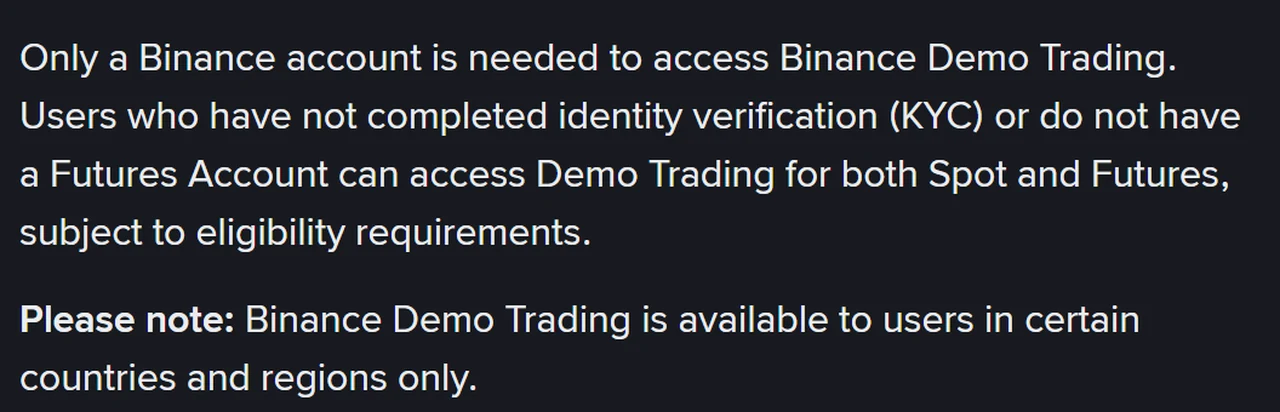
Worth knowing before you go in: by the same page, spot demo does not support trading bots or copy trading, and futures demo leaves out TWAP, close-all-by-PnL, search history, heatmaps, top movers, webhooks, grid and all export functions. Order details are not provided either, and support cannot look up demo orders. None of that stops you drilling the basics, but if you came for one specific feature, it may simply not exist there.
The play money has no value and can be reset, so every misclick — wrong side, an extra digit in the quantity, a forgotten open order — costs far less than it would live.
What to drill and in what order is in the demo trading guide; whether you have drilled enough is settled by the three readiness tests.
After you submit: confirming it attached, and whether it can be added later
How to confirm the code actually attached
Fair question: the field gives no feedback, so how would you know?
Two places to look. The account or rewards section usually shows referral information when one is attached. Better still, once you start trading, the fee page inside your account shows the maker and taker rates that actually apply to you. The first tells you the relationship exists; the second tells you what it is worth. The second is more useful.
My own view, for what it is worth: I would not fuss over a fraction of a percent. For someone still learning, a month of trading multiplied by a tiny rate is a negligible sum. What genuinely costs money is the wrong order type, trading too often, or picking the wrong withdrawal network. Those deserve the attention. The code is worth filling in simply because it is free to do so.
What state is a fresh account in
New accounts are not "everything ready" — capability unlocks in layers: sign-up, basic verification, higher verification, then product-specific permissions or risk questionnaires. A greyed-out feature usually means a missing link in that chain, not a bug.
For someone practising, that is a feature. Fewer functions means a cleaner screen and less to click by accident.
If you forgot to enter it, can you add it later?
The short answer: normally no. The field is part of the sign-up form. Once that form is submitted there is usually no self-service route to add a code, and support does not generally make this change.
So if you have already registered, the matter is closed and it is not worth hunting for a guide that claims otherwise. Those guides tend to arrive at the same instruction: open a second account. Do not. Repeat registrations by one person are precisely the pattern risk controls look for, and the cost of that dwarfs the fee difference.
Two things are worth doing instead:
- Check whether it actually is missing. An empty field at sign-up does not always mean no referral: if you arrived through somebody's link, the relationship may have been carried automatically. The section above says where to look.
- If it genuinely is missing, carry on. It affects no part of opening, verifying, trading or withdrawing. You are simply without that one discount layer, and at the scale worked out earlier the difference is far too small to take any risk over.
Which is the argument for spending three seconds on that field while it is in front of you: it is the kind of entry that costs nothing at the time and usually cannot be recovered afterwards. That was the state of the Binance pages when this was checked, September 2026; the page in front of you at sign-up is what counts.
If you are doing this on a phone
Signing up on a phone is convenient because verification wants a camera. A few differences from desktop:
- Where the app comes from. Only your device's own app store, or an entry point you saved yourself. Download buttons in search results and installers forwarded in chats are the main source of fake apps, and a fake app sees everything you type.
- Screenshots. Do not screenshot your documents during verification. Phone galleries usually sync to the cloud, and that photo then travels further than you expect.
- Authenticator on the same phone. Acceptable, as long as you have thought through losing the device — which is why the backup key goes on paper, not in that phone's notes app.
- Notifications. Turn on login and withdrawal alerts. They are your earliest signal that someone else is in your account.
A sensible split: verification on the phone, day-to-day trading on a computer. Phone screens put the quantity and price fields close together, and a thumb slip adds a digit. Harmless while practising; expensive later.
What each sign-up field is asking
| Field | What it really is | Cost of getting it wrong |
|---|---|---|
| Email / phone | Your login identity and code channel | Recovery becomes harder later |
| Password | Login credential | Reuse is the single biggest risk here |
| Referrer ID / referral code | The referral link, which affects fee discounts | Generally cannot be added afterwards |
| Country / region | Determines which products you get | Mismatch with your ID stalls verification |
| Terms checkbox | Legal agreement | Cannot register without it; the risk sections are worth a glance |
Four places beginners lose out
Landing on a fake site from search results
The most expensive mistake available. Lookalike domains are convincing and the page is a copy, so the credentials you type go straight to someone else. Bookmark the real entry point and always arrive through the bookmark.
Screenshotting the 2FA backup key into the photo gallery
Galleries sync to the cloud. If that account is ever breached, your second factor is no longer a second factor. Paper, kept where you keep documents.
Resubmitting verification over and over
It can be treated as a fresh submission and put you back in the queue. Worse, switching to a different set of documents at this point stops being impatience and starts being the kind of thing that flags an account.
Funding heavily on day one
Wrong order. Confirm you can operate the thing for free first. Someone who has to hunt for the cancel button is only prepaying tuition, whatever the amount.
Three misconceptions about the discount
"Using a referral code means paying extra to the referrer"
The other way round. The share comes out of fees the platform already charges; nothing is added to your bill. If the current referral rules include a fee rebate, what you actually pay comes out a little lower. The fee column in each order's trade details shows what you really paid, so you can check it yourself.
"The discount is a fixed number"
It is not. It moves with current campaigns, your region, and the product line. Any source quoting one hard number deserves suspicion. We don't quote a proportion and leave the real figure to your own fee page.
"The code saves a lot of money"
For someone practising, in absolute terms it usually does not. What determines your costs is how often you trade and how you place orders — fees are charged on traded value times the rate, so what matters is how much you trade in a month. Take the same 10,000 USDT: buy and sell once a day for 30 days and you trade about 600,000 in total; make two round trips in the month and you trade about 40,000. At the same rate the first pays 15 times the fees of the second, and the gap widens if the first mostly takes and the second mostly makes. Fee discounts come fourth, after trading less, using limit orders, and not choosing an expensive withdrawal network.
A sensible timeline to the first real trade
Not compulsory, but if you have no reference point, this one works:
- Day one: sign up, enter the code, submit verification, set the three switches. If review is pending, go do something else rather than refreshing.
- The first days after approval: demo only. The aim is to place, cancel and find your fills without consulting a guide.
- Then: deliberately break things in demo — an order that cannot fill, an invalid quantity, a change of position while an order is open. Error messages are what you want to be familiar with, not the smooth path.
- When it feels routine: score yourself on the readiness tests. Short of the mark, go back; at the mark, start thinking about size.
- First real trade: small enough that losing all of it changes nothing, but not so small that fees are an absurd share. That balance point is worked out in how much for the first trade.
Exactly one thing on that line is irreversible: real money lost is lost. Everything else can be redone, and the demo account can be wiped clean. Since so much of it is repeatable, make your mistakes there.
Adding the code later, code versus link, and demo before verification
- I forgot the referral code at sign-up. Can I add it later?
- Once you pass that field there is usually no self-service way to add it. You can check whether a referral is attached to your account in the account or rewards section. If it is not, do not open a second account for this reason — duplicate accounts cause far more trouble than a small fee discount is worth.
- Can I use demo trading before finishing identity verification?
- According to Binance's demo trading help page, all you need is a Binance account; users who have not completed KYC can still access spot and futures demo trading subject to eligibility requirements, and demo trading is only available to users in certain countries and regions. Whether it opens for you is settled by what that page does on your account.
- What is the difference between a referral code and a referral link?
- They are two forms of the same thing. The link already carries the code, so the referrer field is filled in for you; entering the code manually does the same job. The only practical difference is whether you might forget to fill the field.
The page in front of you is what counts. The demo eligibility paragraph comes from "How to Use Binance Demo Trading" in the Binance help centre, and the fee wording follows whatever the spot fee page shows at the time; both were checked in September 2026. If something does not line up, write and tell us.