How Binance fees stack, and where the referral rebate sits
"What are the fees" is a hard question to answer because the answer is not a number — it is four layers stacked on top of one another. Once the order is clear you can work out your own figure and read the fee table without help.
The four layers
One: maker or taker
The base layer, and the one most beginners have never heard of.
Maker means your order rests on the book and someone else comes to it. Taker means you take liquidity that is already there. A market order is always taker; a limit order priced right against the market that fills instantly is also taker.
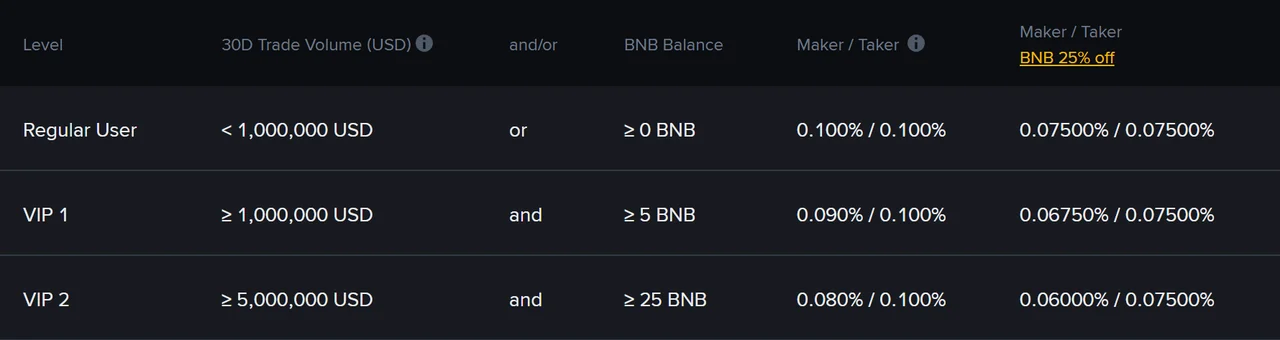
Per the Binance spot fee page at the time of checking (September 2026), a regular user pays 0.100% for both. The two diverge from VIP 1 upward, where maker falls to 0.090% while taker stays at 0.100%, and the gap widens with tier.
So this layer does not currently change your number as a beginner. The habit still matters: besides the potential saving later, a limit order guarantees you never trade at a price you did not agree to.
Two: your tier
Tier depends on thirty-day trading volume and holdings of the platform token. The fee page states the thresholds plainly — when checked in September 2026, VIP 1 required 30-day volume of at least 1,000,000 USD and at least 5 BNB held (the screenshot above shows that row).
That number is quoted here so you can dismiss this layer: a beginner is not going to reach it. A million dollars of monthly volume is not "trading a bit more often".
For completeness, the page also notes the volume calculation covers spot, margin, convert, copy trading and trading-bot volume, measured in USD equivalent. Worth knowing exists; not worth planning around.
Three: paying fees in the platform token
The one layer a beginner can use immediately.
Enable paying trading fees in BNB and the rate is reduced by 25% — for a regular user that takes 0.100% to 0.075% (same source, same date).
The cost is holding a little BNB for the purpose, and BNB's own price moves. The trade-off:
- If you trade very little, the saving may not outweigh being exposed to that price movement;
- If you expect to keep using the platform, it is close to a free discount.
One way to keep that variable small is to hold only enough BNB to cover fees for a while, and no more.
Four: the referral rebate
Different in kind from the first three: those are granted for your behaviour, this one comes from a referral relationship.
- It is attached at sign-up, in the referrer field, and generally cannot be added later.
- Where a benefit applies to your account, it is a fee rebate: part of the trading fee you paid, up to 20% under Binance's referral rules, comes back to you after the trade.
- Whether it applies at all, and the exact proportion, follow the current referral rules and your region; filling in a code does not guarantee one. That is why this site gives only the cap, not the share you will get; Binance's own pages for your account are authoritative.
Where the field is and how to confirm it attached is covered in the sign-up article.
How the four stack
The two in orange are the ones a beginner can act on: the BNB toggle lowers the rate itself, while a referral rebate, where it applies, returns part of what you paid. Each applies to the result of the one above it, so percentages multiply rather than add — 25% off and then 20% back is not 45% off.
How they combine
Order matters, because each layer applies to the result of the previous one.
- Establish the base: maker or taker, and your tier. For a regular user on spot that is 0.100%.
- Apply the token discount: 25% off, taking 0.100% to 0.075%.
- Apply the referral relationship, per current rules: any rebate is a share of the fee already charged, paid back afterwards.
Why stress "stacked" rather than "added"? Because if someone tells you "25% off plus 20% back equals 45% off", that is the wrong arithmetic. The percentages multiply.
You do not need to compute the final figure yourself — once logged in, the fee page shows the rate that applies to you. This site does not print that final number, because it varies with tier, settings, promotions and region.
Where to see your own number
Rather than memorising published rates, learn to find your own row. Logged in, the fee page shows the maker and taker rates that actually apply given your tier and settings.
Two other places worth checking:
- The order confirmation, which usually estimates the fee before you commit. Glance at it.
- Trade history, which shows what was actually charged and in which asset. This is also the reliable way to confirm the token discount is in effect — you will see the fee taken in BNB.
After changing any fee setting, check trade history on your next trade, because "the toggle is on" and "this trade was charged the new way" are two different claims.
Costs outside these four layers
All four concern trading fees. Two other things are part of your real cost:
- Withdrawal fees: a fixed quantity per coin and network, unaffected by tier, token discount or referral. On small balances they are the dominant cost — the arithmetic is here.
- Spread and slippage: never itemised, but they take real money, and the thinner the book the more.
It is easy to study the fee tiers carefully and then pick an expensive withdrawal network, losing more than the discount ever saved. These two deserve the same attention.
One worked month, all four layers applied
Layers are easier to believe once you put numbers through them. Take a month of ten round trips at 100 units of quote currency each — 2,000 units of total traded value, since every round trip is a buy and a sell.
Base case, regular user, no settings changed. At 0.100% per side, 2,000 × 0.001 = 2.00 units of fees for the month.
With the token discount. The rate becomes 0.075%, so 2,000 × 0.00075 = 1.50. You have saved 0.50 — a quarter, exactly as advertised.
With a referral relationship on top. A referral benefit, where it applies, is a rebate: part of that 1.50 comes back to you after the trade. Whatever proportion applies to your account, Binance's own pages state it, and this site does not.
Now the comparison that matters. Keep every setting the same but make four round trips instead of ten: 800 × 0.00075 = 0.60. Against the 1.50 you were paying with the discount on, that is a 60% reduction, from one decision, with no settings, no tier and no relationship involved. Put the two side by side: the token discount took 2.00 to 1.50, trading less often took 1.50 to 0.60.
Checking the arithmetic: ten round trips at 100 units each is 10 × 2 × 100 = 2,000 units of traded value; at 0.075% that is 1.5 units of fees. Four round trips is 800 units of value and 0.6 units of fees. Both figures follow from the rate alone, so you can redo them with your own rate and your own count in the cost calculator.
Why the futures table is a different table
One thing that trips people up when they go looking: the fee page has more than one table, and the spot rates do not apply to derivatives.
Futures rates are published separately, are usually lower per side than spot, and are calculated on the notional value of the position rather than on what you put in. With leverage applied, a small amount of margin can carry a much larger notional, so the fee attaches to the larger number. That alone makes the comparison "futures are cheaper" misleading at beginner scale.
Two further costs exist there and nowhere in the spot table: funding payments, exchanged periodically between long and short holders while a perpetual position is open, and the cost of a forced liquidation, which is not a fee you are quoted in advance. Neither has an equivalent on spot.
The practical takeaway is not to memorise the second table. It is to notice which table you are reading, because a rate copied from the wrong one will make every estimate you build on it wrong. What leverage actually changes is covered in the leverage article.
Which layers a beginner can use
| Layer | Usable now | Worth the time |
|---|---|---|
| Maker / taker | Yes, though rates are equal today | Worth the habit, for reasons other than cost |
| Tier | No | Ignore |
| Token discount | Yes, one toggle | Yes — cheapest win available |
| Referral rebate | Depends on current referral rules, and can only be attached at sign-up | Yes, since the field has to be filled anyway |
And a closing thought that may be unwelcome: all four layers together usually save less than simply trading less often.
Going from 0.1% to 0.075% removes a quarter of your trading fee. Going from thirty round trips a month to ten removes two thirds. The cumulative table shows thirty round trips needing more than six percent of favourable movement before you break even. Put those two numbers side by side and it is clear which deserves your attention.
Source for the numbers: the Binance spot fee page, checked September 2026. Rates and discount proportions both get adjusted, so the current figures on your own fee page are the ones that count.